Integrating AiPrise KYB with Salesforce
Last updated: May 26, 2026
A reference architecture and implementation guide for bidirectional KYB verification between Salesforce and AiPrise, built around AiPrise's Business Profile primitive.
Audience: Salesforce architects, RevOps, and compliance engineering teams at AiPrise customers running a B2B sales motion who want to verify business customers as part of their CRM workflow.
Scope: KYB verification, including UBO and officer/director checks that run as part of KYB. KYC for end users, payments-side AML monitoring on transactions, and pure document verification flows follow similar patterns but are out of scope for this guide.
1. Integration overview
1.1 What this integration does
AiPrise verifies businesses against 500+ registries across 200+ countries, runs sanctions and PEP screening on the business and its related persons (UBOs, directors, officers), maps out ownership chains, and returns a structured decision (APPROVED, DECLINED, MANUAL_REVIEW, FAILED). This guide describes how to surface that capability inside Salesforce so that:
Sales, RevOps, or Compliance users initiate KYB on an Account directly from Salesforce.
Verification results, related persons, related companies, and AML hits flow back to Salesforce automatically.
Any subsequent activity inside AiPrise (analyst changes the decision after EDD, edits business data, adds comments, catches an AML hit during ongoing monitoring) propagates back to Salesforce in real time.
For complex ownership chains, sanctions hits, or any case requiring Enhanced Due Diligence (EDD), reviewers leave Salesforce and complete the work in the AiPrise platform. The outcome and all intermediate activity syncs back to Salesforce.
1.2 Architecture at a glance

The middleware layer handles protocol translation, retry logic, idempotency, credential management, and translation from AiPrise webhook events into Salesforce Platform Events. Salesforce never calls AiPrise directly. AiPrise never calls Salesforce directly.
1.3 Why middleware (and not direct Apex callouts)
For most enterprise deployments, we recommend an integration platform (MuleSoft, Workato, Tray, Boomi, or a thin AWS Lambda + API Gateway) between Salesforce and AiPrise. The reasons:
Webhook reliability. AiPrise retries failed webhooks, but Salesforce Apex REST endpoints have governor limits and Site/Connected App constraints. Middleware absorbs spikes and queues retries.
Multiple event types. AiPrise sends 7+ distinct event types per business profile. Middleware is the right place to translate each one into a typed Salesforce Platform Event rather than parsing JSON inside Apex.
Credential isolation. Your AiPrise API key lives in the middleware vault, not in Salesforce custom settings.
Observability. Integration platforms give you per-call logs, replay, and alerting that Salesforce Event Logs cannot match.
If your team prefers a Salesforce-native approach using Apex REST + Named Credentials + Platform Events, that pattern works for lower-volume deployments. This guide focuses on the middleware pattern.
2. Core concepts: Business Profile vs Business Case
Before mapping anything to Salesforce, understand the two AiPrise primitives:
Concept | What it is | Lifecycle | Best fit for |
|---|---|---|---|
Business Profile | A long-lived, persistent record of a business entity. Supports multiple verification sessions over time and ongoing AML monitoring. | Persists for the life of the customer relationship. | Sales / CRM motions where you verify the same business once at onboarding and refresh annually or on trigger events. |
Business Case (Session) | A one-shot KYB workflow. Lives inside a Profile (or standalone). Terminates at a final decision. | Short-lived. Ends at APPROVED / DECLINED / MANUAL_REVIEW / FAILED. | Individual verification runs. Multiple Cases per Profile over time. |
For B2B sales motions, always use Business Profiles. Each Salesforce Account maps to one AiPrise Business Profile. Each KYB run on that Account creates a new Verification Session (Case) under the Profile. This pattern:
Preserves verification history across the customer lifecycle
Enables ongoing AML monitoring (a Profile-level capability)
Surfaces analyst edits, decision changes, and comments back to Salesforce continuously, not just at the moment of initial verification
The rest of this guide assumes Profile-first.
3. The bridge: client_reference_id
This is the single most important integration design decision. Get it right and your middleware stays stateless; get it wrong and you spend the rest of the project maintaining a mapping table.
3.1 What it is
When you create a Business Profile or run a verification, you pass two optional but extremely useful fields:
client_reference_id: A string of your choice. AiPrise stores it on the Profile and echoes it back in every event and decision callback.client_reference_data: A JSON object of arbitrary metadata. Also echoed back.
3.2 What to put in them
client_reference_id = your Salesforce Account 18-character ID.
Use the 18-character version, not 15-character. 15-character IDs are case-sensitive and break in middleware that normalizes case.
client_reference_data = a small bag of routing metadata your middleware or Salesforce automations may need:
{
  "sf_account_id": "001Hp00002abc123IAA",
  "sf_account_name": "Acme Corporation Ltd",
  "sf_environment": "production",
  "triggered_by_sf_user_id": "005Hp00000xyz789",
  "sf_opportunity_id": "006Hp00002def456IAA",
  "purpose": "initial_onboarding"
}
Keep this small. Do not pack PII or sensitive business data into client_reference_data since it travels through every webhook payload.
3.3 Why this matters
With client_reference_id set to the SF Account ID, your middleware doesn't need a database. Every webhook arrives self-describing: it tells the middleware which Salesforce Account to update without any lookup. This means:
No middleware-side mapping table to maintain
No race conditions between Profile creation and the first webhook
Replay safety: any webhook can be reprocessed at any time and route correctly
Auditability: the SF Account ID is in every payload AiPrise stores
Treat client_reference_id as immutable once set. Changing it later breaks downstream automation.
4. Entity mapping: AiPrise to Salesforce
AiPrise concept | Salesforce object | Relationship | Notes |
|---|---|---|---|
Business Profile |
| 1:1 | One AiPrise Profile per Salesforce Account. |
Verification Session (Case) |
| Account 1:N | One record per KYB run. Preserves history. |
Related Person (UBO, Director, Officer, CEO, etc.) |
| Account 1:N | Custom object, not Contact. See section 4.3. |
Related Company (parent, subsidiary) |
| Account 1:N | Ownership chain entities. Optional. See section 4.4. |
AML Match (initial or ongoing) |
| Account 1:N, also linked to Related Person if subject is a person | One record per match. |
Registry Check |
| Verification 1:N | Optional. Useful for jurisdictions with multiple registries. |
Document |
| Verification 1:N | Stores presigned URLs back to AiPrise, not binary files. |
Analyst Comment |
| Verification 1:N | Optional. |
4.1 Account object: recommended custom fields
These fields live on the standard Account object and reflect the current state of the AiPrise Business Profile. They are denormalized from the latest verification for easy reporting and list view filtering.
Field API name | Type | Purpose |
|---|---|---|
| Text (External ID, Unique) | The |
| Picklist |
|
| DateTime | When the most recent verification completed. |
| Picklist |
|
| Number(5,0) | Mirrors |
| Checkbox | True if any match exists on the business or any related person. |
| Checkbox | True if any related person is a PEP. |
| Checkbox | True if any sanctions match exists. |
| Checkbox | Mirrors |
| Text(2) | ISO-2 from |
| Text | LIMITED_COMPANY, LLC, C_CORP, etc. |
| Text | Registration number. |
| Date | From |
| Picklist |
|
| Checkbox | Mirrors |
| URL | Deep link to the Profile in AiPrise platform. One-click access for EDD. |
4.2 AiPrise_Verification__c: the verification session record
Every KYB run creates a new AiPrise_Verification__c. The Account-level fields above always reflect the most recent one; older records are preserved for audit.
Field API name | Type | Purpose |
|---|---|---|
| Lookup (Account) | |
| Text (External ID, Unique) |
|
| Text | Which AiPrise template configuration ran. |
| Picklist |
|
| Picklist |
|
| Long Text Area | From |
| Long Text Area | JSON array. |
| Long Text Area | JSON array. Populated when status = FAILED. |
| DateTime | |
| DateTime | |
| Lookup (User) | The SF user who initiated. |
| Long Text Area (32K) | Last full decision callback payload, for audit. |
| URL | Deep link. |
4.3 AiPrise_Related_Person__c: the related persons object
This object covers UBOs, directors, officers, CEOs, CFOs, authorized signatories, and shareholders. They come from related_persons in the decision payload. Modeled as a custom object, not Contact, because they are compliance entities with fields that don't fit Contact (ownership percentage, PEP status, AML status, KYC completion).
Field API name | Type | Purpose |
|---|---|---|
| Auto-number or full name | |
| Lookup (Account) | |
| Lookup (AiPrise_Verification__c) | Which run surfaced this person. |
| Text (External ID, Unique) |
|
| Text | |
| Text | |
| Date | |
| Text(2) | ISO-2 |
| Multi-select Picklist |
|
| Number(5,2) | |
| Number(18,0) | |
| Picklist |
|
| Checkbox | |
| Picklist |
|
| Checkbox | Derived. |
| Checkbox | Derived. |
| URL | If a KYC session was run, deep link to it. |
A note on multiple roles: a single person frequently holds multiple roles (CEO + Director + UBO is common). AiPrise returns this as an array. Use a multi-select picklist in Salesforce and map directly from the roles array.
4.4 AiPrise_Related_Company__c: ownership chain entities
For customers with corporate ownership structures (holding companies, subsidiaries, joint ventures), AiPrise returns related_companies. Each entry has its own verification status. If your customer profile is mostly simple LLCs and Ltds, you may skip this object. If you sell to mid-market or enterprise where corporate structures are common, build it.
Field API name | Type | Purpose |
|---|---|---|
| Text | Legal name. |
| Lookup (Account) | The Account this related company is attached to. |
| Lookup (AiPrise_Verification__c) | |
| Text (External ID) | |
| Text | |
| Text(2) | |
| Text | |
| Picklist |
|
| Number(5,2) | |
| Picklist |
|
| Checkbox | |
| Lookup (Account) | Optional. If the related company also exists as a separate Account in your CRM, link here. |
4.5 AiPrise_AML_Match__c: sanctions, PEP, and adverse media matches
One record per match. Populated both from aml_info.matches in the initial verification and from aml_monitoring_update.matches during ongoing monitoring. This is what makes "show me all Accounts with active sanctions hits" a real-time dashboard.
Field API name | Type | Purpose |
|---|---|---|
| Lookup (Account) | |
| Lookup (AiPrise_Related_Person__c) | Null if the match is on the business entity itself. |
| Lookup (AiPrise_Verification__c) | The run that surfaced this match. |
| Picklist |
|
| Text | OFAC SDN, EU Consolidated Sanctions, UK HMT, etc. |
| Text | Matched name on the list. |
| Number(3,2) | 0.00 to 1.00 |
| URL | Source. |
| Picklist |
|
| Picklist |
|
| DateTime | |
| URL | Direct link to the case in AiPrise platform for review. |
| Long Text Area | Full match JSON. |
5. API authentication and environments
5.1 Environments
Environment | Base URL | Purpose |
|---|---|---|
Sandbox |
| Development and testing. Use against Salesforce sandbox. |
Production |
| Production traffic only. |
Use entirely separate API keys per environment. Store both in your middleware secret manager.
5.2 Authentication
AiPrise uses API key authentication via request header. Keys are provisioned per environment by your AiPrise FDE. Do not store API keys in Salesforce custom settings or custom metadata; keep them in your middleware vault.
5.3 Callback authentication
AiPrise signs every webhook so middleware can verify authenticity. See Callback Authentication for the signing scheme. Configure signature verification in middleware before going to production. Reject any inbound webhook that fails signature verification.
6. Core workflows
6.1 Workflow A: Initial KYB on a new Account
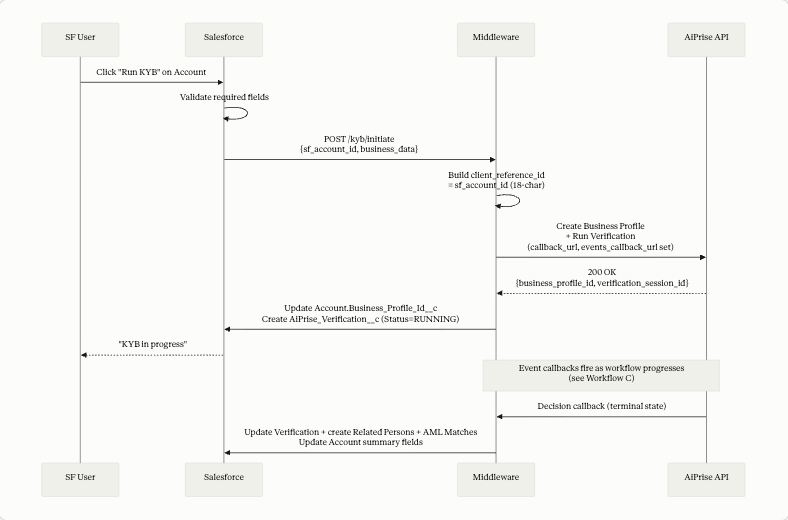
Required input fields from Salesforce (minimum):
Business legal name
Jurisdiction (ISO-2 country code)
Either company registration number or tax identifier
Best practice: validate these in Flow before the callout. Surface a clear error if missing. Optional but valuable additions: trading name, registered address, website, industry, declared UBOs.
Trigger options inside Salesforce:
Button on Account page layout. Quick Action that calls a Flow which invokes an HTTP Callout (via Named Credential pointing to middleware).
Flow on Account stage change. When an Account moves to "Compliance Review" or "Pending Verification," automatically initiate KYB.
Manual Flow Screen. Reviewer fills additional context (purpose of relationship, expected transaction volume) before triggering.
6.2 Workflow B: Receiving the decision callback
When a verification reaches a terminal state, AiPrise POSTs the full BusinessVerificationResultPayload to the callback_url. This is the big one. It contains everything: business info, registry checks, AML results, related persons, related companies, fraud signals, and risk scoring.
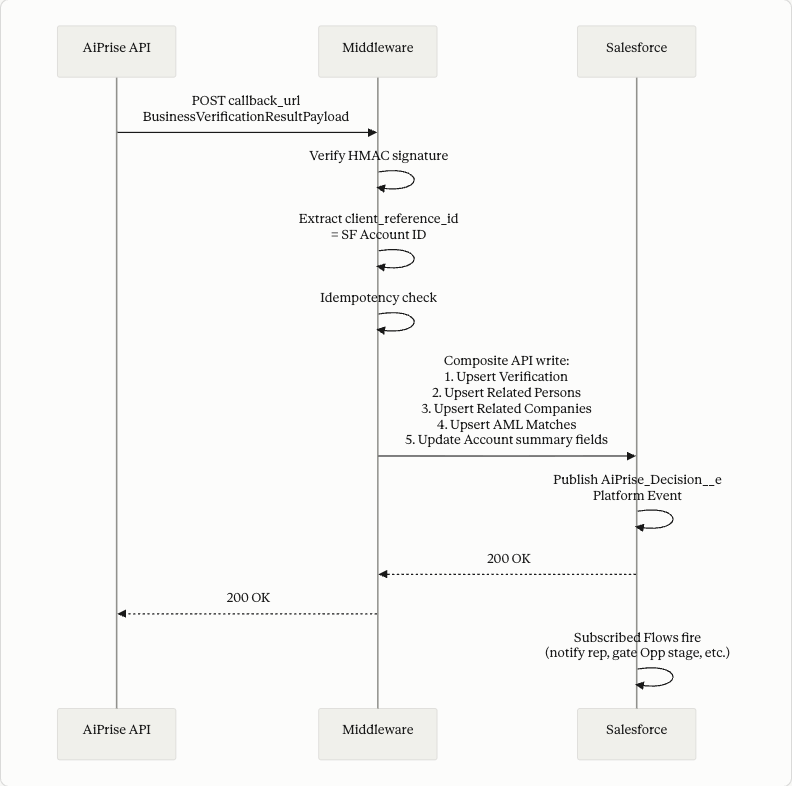
Write order matters. Verification record is the parent for Related Persons, Related Companies, and AML Matches (via Verification__c lookup). Upsert Verification first using verification_session_id as External ID, then upsert children referencing it. Use Salesforce Composite API to do this in a single transaction.
Mapping the decision payload to Salesforce records:
AiPrise payload field | Target |
|---|---|
|
|
|
|
| Used to look up SF Account (don't store again). |
|
|
|
|
|
|
|
|
|
|
|
|
|
|
|
|
|
|
|
|
| Create |
|
|
| Upsert |
| Upsert |
|
|
|
|
Idempotency:
AiPrise retries on non-2xx. Middleware deduplicates based on verification_session_id + event type + a hash of the payload. Repeated payloads are no-ops. Always return 2xx if you've successfully processed (or already processed) the event.
6.3 Workflow C: Lifecycle events
While Workflow B handles the terminal decision, the events_callback_url channel sends real-time updates throughout the KYB lifecycle and beyond. This is where the most operational value lives, and it's what enables truly bidirectional Salesforce.
Each event maps to a Platform Event in Salesforce so Flows and Apex triggers can react.
AiPrise event | Triggered when | Salesforce Platform Event | Recommended SF action |
|---|---|---|---|
| Customer begins KYB flow |
| Update Verification.Status to RUNNING. Notify AE. |
| Customer finishes data entry |
| Update status. Notify compliance queue. |
| Workflow reaches terminal state |
| Same handling as decision callback (Workflow B). |
| Reviewer changes decision after EDD |
| Update Verification.Decision and recompute Account fields. |
| Ongoing AML monitoring catches a hit |
| Create new AML_Match record. Update Account flags. Page compliance team. |
| Analyst edits business data |
| Update Account fields with new values. Optionally Chatter-post the diff. |
| Reviewer adds a comment |
| Post to Chatter feed on the Account or create child Comment record. |
6.3.1 CASE_STATUS_UPDATE: the EDD outcome flow
This is the most important event for this customer's stated requirement (EDD outcomes coming back from AiPrise to Salesforce).
When a compliance reviewer completes EDD inside the AiPrise platform and changes the case decision (for example, clears a sanctions hit as a false positive and moves the decision from MANUAL_REVIEW to APPROVED), AiPrise fires CASE_STATUS_UPDATE:
{
  "event_type": "CASE_STATUS_UPDATE",
  "verification_session_id": "bvs_abc123",
  "client_reference_id": "001Hp00002abc123IAA",
  "verification_result": "APPROVED",
  "author": {
    "email_address": "[email protected]",
    "name": "Senior Compliance Officer"
  },
  "reason": "Sanctions match cleared as false positive after EDD",
  "person_reference_id": null,
  "file_uuid": null
}
Middleware → Salesforce:
Look up
AiPrise_Verification__cbyverification_session_idUpdate
Decision__cto the new valueAppend the
reasonandauthorto aDecision_Notes__cfield with a timestampRecompute Account summary fields (
AiPrise_KYB_Status__c,AiPrise_Has_Sanctions_Hit__c, etc.)Publish
AiPrise_Case_Status_Changed__eso Flows can react (notify AE, unlock Opportunity, etc.)
6.3.2 AML_MONITORING_UPDATE: ongoing monitoring catches a hit
If AML monitoring is enabled on the Business Profile, AiPrise continues screening against sanctions and PEP lists indefinitely. When a new match appears (e.g., a customer's UBO gets added to a sanctions list), this event fires:
{
  "event_type": "AML_MONITORING_UPDATE",
  "verification_session_id": "bvs_abc123",
  "client_reference_id": "001Hp00002abc123IAA",
  "aml_monitoring_update": {
    "monitoring_run_id": "mon_biz_xyz789",
    "status": "MATCH_FOUND",
    "matches": [
      {
        "list_name": "EU Consolidated Sanctions",
        "entity_name": "ABC Corporation Ltd",
        "confidence": 0.96,
        "reference_url": "https://sanctions.eu/..."
      }
    ],
    "previous_status": "CLEAR"
  }
}
This is high-value. Middleware should:
Create a new
AiPrise_AML_Match__cper match withSource_Event = "Ongoing Monitoring"Set
Account.AiPrise_Has_AML_Hit__c = trueand recompute risk flagsPublish
AiPrise_AML_Hit__ePlatform EventTrigger a high-priority Flow that creates a Case in Salesforce assigned to the compliance queue, optionally suspends the Account, or pauses Opportunities
6.3.3 SECTION_INFO_UPDATE: analyst edits business data
When an AiPrise analyst corrects business data (e.g., updates the registered address after seeing better registry data), this event fires with previous and current values:
{
  "event_type": "SECTION_INFO_UPDATE",
  "verification_session_id": "bvs_abc123",
  "client_reference_id": "001Hp00002abc123IAA",
  "data": {
    "section_name": "business_address",
    "updated_fields": {
      "registered_address": {
        "previous": "123 Old Business Park",
        "current": "456 Corporate Plaza, Suite 100"
      }
    },
    "updated_by": "[email protected]",
    "updated_at": 1702345678000
  }
}
Middleware updates the corresponding Account fields. Recommendation: post the diff to Chatter on the Account so the AE sees that compliance corrected the address. This builds trust in the integration and gives sales context about what changed.
6.4 Workflow D: Rerunning KYB
When the customer's circumstances change (new UBO disclosed, change of registered address, annual refresh), trigger a new verification session against the existing Business Profile.
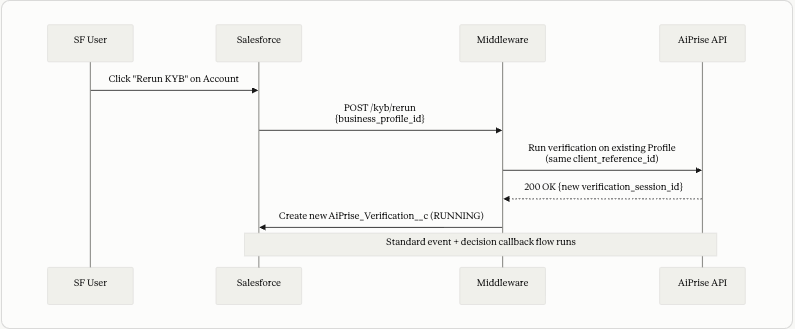
The Business Profile is reused. A new Verification record is created. Account-level summary fields update once the new run completes.
7. Surfacing AiPrise in the Salesforce UI
A few patterns that work well:
Account record page. A custom Lightning Web Component that shows current KYB status, last verified date, risk level, AML/PEP/sanctions flags, AML monitoring on/off, and a "Open in AiPrise" button that deep-links to the Profile.
Related lists. Add AiPrise_Verification__c, AiPrise_Related_Person__c, AiPrise_Related_Company__c, and AiPrise_AML_Match__c as related lists on the Account page.
Ownership graph. If you're displaying complex ownership chains, a small custom LWC that renders the AiPrise_Related_Person__c and AiPrise_Related_Company__c records as a tree gives reviewers a quick visual without leaving Salesforce. For deeper visualization, link out to AiPrise.
Path on Verification. Add a Path component on AiPrise_Verification__c (RUNNING → COMPLETED → final decision). Visual state for reviewers.
Validation Rule on Opportunity. Most B2B customers want to block contract signature until KYB is Approved. Add a Validation Rule that prevents Opportunity from moving to Closed Won unless the parent Account has AiPrise_KYB_Status__c = 'Approved' and AiPrise_Has_Sanctions_Hit__c = false.
List views.
"Accounts with Open Sanctions Hits"
"Accounts in Manual Review"
"Accounts requiring KYB Refresh" (last verified > 12 months ago)
"AML Matches by Status"
These become working queues for the compliance team inside Salesforce.
8. Error handling and operational concerns
8.1 Failure modes
Failure | Where | Handling |
|---|---|---|
Required field missing when triggering KYB | SF → MW | Validate in Flow before callout; surface error to user. |
AiPrise API returns 4xx | MW → AP | Log, surface via Platform Event, do not retry. |
AiPrise API returns 5xx | MW → AP | Exponential backoff, 3 retries, then alert. |
Webhook arrives with unknown | AP → MW | Log and return 2xx. Do not create orphan records. Alert separately. |
Webhook signature invalid | AP → MW | Return 401. Alert immediately (possible spoofing attempt). |
Salesforce write fails | MW → SF | Retry. If persistent, dead-letter queue and page on-call. Return non-2xx to AiPrise so it retries upstream. |
Duplicate webhook | AP → MW | Idempotency check on session_id + event_type + payload hash. |
8.2 Status reasons and warning codes
When aiprise_summary.status = FAILED, the status_reasons array tells you why. Common codes are documented at Status Error Codes. Warning codes (warning_codes) are non-blocking but should still surface to compliance reviewers; full list at Warning Codes.
Map these to actionable messages in Salesforce so users know whether to retry, supply more data, or escalate.
8.3 Audit logging
Store the raw decision callback payload on the Verification record (Full_Payload__c). Capture middleware request/response logs in your integration platform with at least a 7-year retention window. This is what auditors will ask for.
9. Security
AiPrise API key in middleware vault (AWS Secrets Manager, HashiCorp Vault, Workato Connection, MuleSoft Secure Properties). Never in Salesforce.
Salesforce → Middleware uses Named Credentials with OAuth 2.0 client credentials flow or mTLS.
Middleware → Salesforce uses a Salesforce Integration User with scoped permissions on
Account(specific fields) and the AiPrise custom objects. Do not use an admin user.Webhook signature verification required in production. Reject unsigned or invalid-signature webhooks with 401.
Field-Level Security on AiPrise custom fields: restrict Related Person PII (DOB, nationality), AML Match details, and adverse media flags to Compliance and Admin profiles. Sales sees status and risk level only.
client_reference_datashould not contain PII or sensitive metadata. Treat it as middleware-visible logging metadata.
10. Testing checklist
Before going live, run through these scenarios end to end in sandbox:
[ ] Trigger KYB on a new Account; verify
business_profile_idis stored and Verification is created.[ ] Receive a
VERIFICATION_SESSION_STARTEDevent; verify Verification status updates.[ ] Receive a decision callback with
APPROVED; verify Account fields update correctly.[ ] Receive a decision callback with
MANUAL_REVIEWand a sanctions match; verifyAiPrise_AML_Match__cis created andAccount.AiPrise_Has_Sanctions_Hit__c = true.[ ] Receive a decision callback with multiple
related_persons, multiplerolesper person; verify multi-select picklist populates correctly.[ ] Receive a decision callback with
related_companies(parent + subsidiary); verify ownership chain records.[ ] Receive a
CASE_STATUS_UPDATEevent clearing a false positive; verify Verification decision updates and Account flags recompute.[ ] Receive an
AML_MONITORING_UPDATEevent with a new match; verify new AML_Match record (Source_Event = Ongoing Monitoring), Account flag update, and Platform Event publishes.[ ] Receive a
SECTION_INFO_UPDATEevent; verify the Account field updates with new value, and the diff posts to Chatter.[ ] Receive a
COMMENTevent; verify it surfaces in SF.[ ] Rerun KYB on the same Account; verify a new Verification record is created and Account summary reflects the latest run.
[ ] Send a duplicate webhook; verify no duplicate records.
[ ] Salesforce write fails; verify retry succeeds and AiPrise sees 2xx eventually.
[ ] Webhook with invalid signature; verify 401 and alert fires.
[ ] User without proper FLS opens an Account with sanctions hits; verify they cannot see Related Person PII.
11. Quick reference
11.1 Key AiPrise documentation links
11.2 Decision values
Value | Meaning |
|---|---|
| All checks passed. |
| One or more blocking checks failed. |
| Requires human review in AiPrise. |
| Technical error in processing. Retry advised. |
11.3 Event types
Event | Fires when |
|---|---|
| Customer begins KYB flow. |
| Customer finishes data entry. |
| Workflow reaches terminal state. |
| Reviewer manually changes decision (EDD outcome). |
| Ongoing AML monitoring detects a change. |
| Analyst edits business data. |
| Reviewer adds a comment. |
12. Implementation timeline
Week | Milestone |
|---|---|
1 | Schema design review with AiPrise FDE; create custom objects, fields, and Platform Events in SF sandbox. |
2 | Middleware build: SF → AiPrise direction (create Profile, trigger verification). |
3 | Middleware build: AiPrise → SF direction (decision callback handler). |
4 | Middleware build: AiPrise → SF event callback handlers (7 event types, 7 Platform Events). |
5 | Lightning component on Account page; list views; Path; Validation Rules. |
6 | UAT with compliance and sales teams using real test cases. |
7 | Production cutover; monitor for two weeks; iterate on edge cases. |
Appendix A: Schema summary
Custom objects:
AiPrise_Verification__cAiPrise_Related_Person__cAiPrise_Related_Company__c(optional, for ownership chains)AiPrise_AML_Match__cAiPrise_Registry_Check__c(optional)AiPrise_Document__c(optional)AiPrise_Comment__c(optional, alternative to Chatter)
Custom fields on Account: see section 4.1.
Platform Events:
AiPrise_Session_Started__eAiPrise_Submitted__eAiPrise_Decision__eAiPrise_Case_Status_Changed__eAiPrise_AML_Hit__eAiPrise_Data_Updated__eAiPrise_Comment_Added__e
Permission sets:
AiPrise_Sales_View(read Account summary fields only)AiPrise_Compliance_Reviewer(read/write all AiPrise objects and PII)AiPrise_Integration_User(used by middleware: CRUD on AiPrise objects, write on flagged Account fields)
Appendix B: Contact
For implementation support, schema review, webhook secret provisioning, or to discuss your specific KYB template configuration, contact your AiPrise Forward Deployed Engineer or reach out at support@aiprise.com.