API Recipe: How to Run Full KYB Verification on a Business Profile
Last updated: March 31, 2026
This guide walks through the complete API workflow for running Know Your Business (KYB) verification using Business Profiles. Each step builds on the previous one, and callbacks are sent at every stage so you can track progress in real time.
Base URL: https://api.aiprise.com/api/v1/verify
Authentication: All requests require the x-api-key header.
Complete Flow Diagram
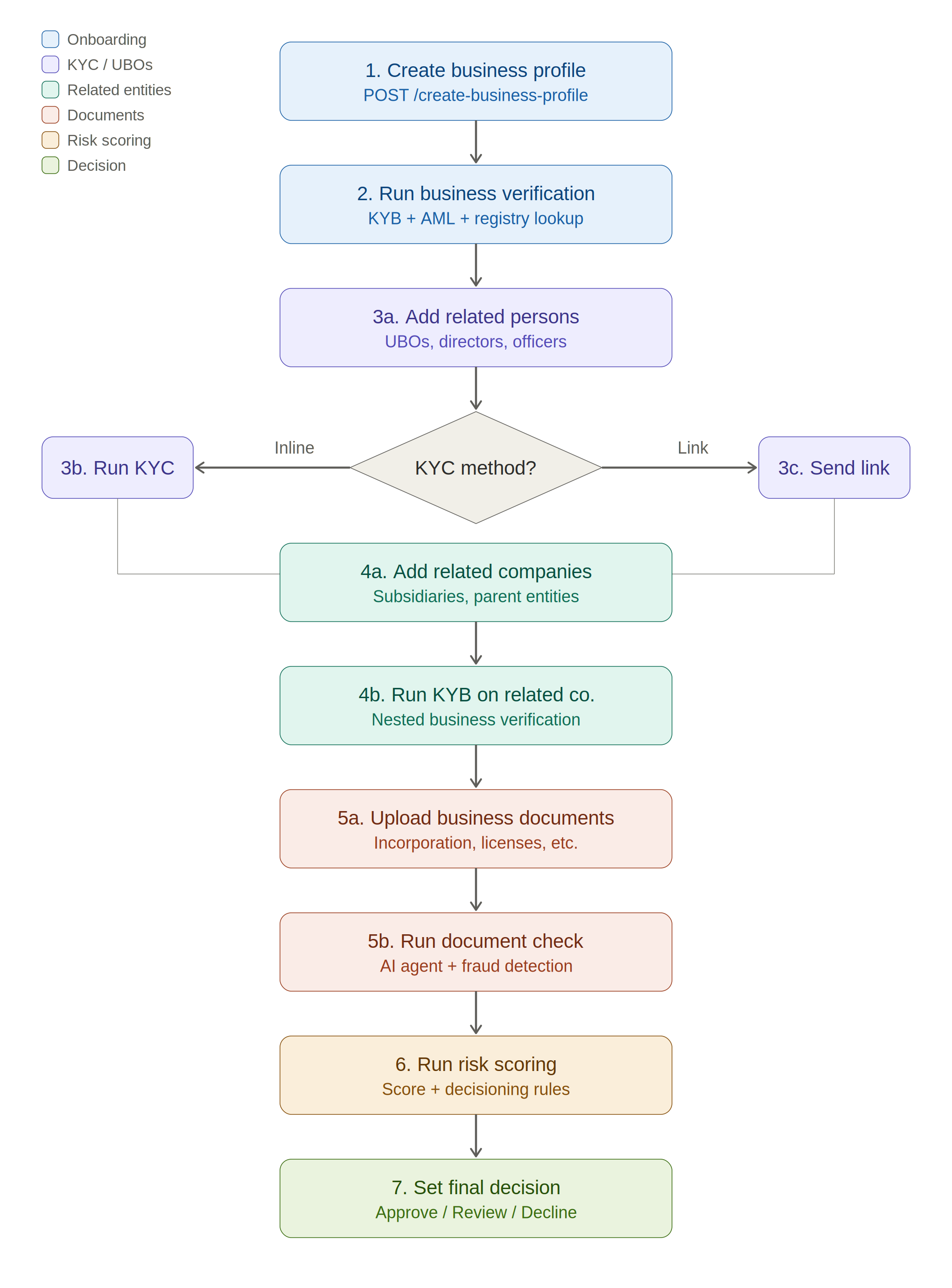
Overview
Step | Endpoint | Purpose |
1 |
| Create the business entity |
2 |
| Run KYB checks (registry lookup, AML, etc.) |
3a |
| Add a related person (UBO/director) |
3b |
| Run KYC on the related person |
3c |
| Generate a verification link instead |
4a |
| Add a related company |
4b |
| Run KYB on the related company (using its business profile ID) |
5a |
| Upload a business document |
5b |
| Run document check |
6 |
| Run risk scoring / decisioning |
7 |
| Set final decision (Approve/Decline/Review) |
Step 1: Create a Business Profile
Create a persistent business entity that will hold all verification data, related persons, companies, and documents.
POST /api/v1/verify/create_business_profile
Request
{
  "name": "Acme Corporation",
  "alternate_name": "Acme Corp",
  "tax_identification_number": "12-3456789",
  "website": "<https://acme.com>",
  "country_code": "US",
  "state_code": "DE",
  "formation_date": "2015-03-15",
  "business_entity_id": "your-internal-id-123",
  "client_reference_id": "your-internal-tracking-id",
  "client_reference_data": {
    "internal_case_number": "CASE-2024-001",
    "onboarding_source": "partner-api"
  },
  "addresses": [
    {
      "address_street_1": "123 Main St",
      "address_street_2": "Suite 400",
      "address_city": "Wilmington",
      "address_state": "DE",
      "address_zip_code": "19801",
      "address_country": "US"
    }
  ],
  "phone_numbers": ["+13025551234"],
  "email_addresses": ["compliance@acme.com"],
  "tags": ["high-value", "fintech"]
}
client_reference_id— your internal reference ID for tracking this business across systemsclient_reference_data— arbitrary JSON metadata you want attached to this profile (carried forward to all verification sessions)
Response
{
  "business_profile_id": "bp_a1b2c3d4-e5f6-7890-abcd-ef1234567890"
}
Callback
Event type: BUSINESS_PROFILE_CREATE
{
  "callback_event_id": "evt_...",
  "event_type": "BUSINESS_PROFILE_CREATE",
  "business_profile_id": "bp_a1b2c3d4-..."
}
Save the business_profile_id — you will use it in every subsequent call.
Step 2: Run Verification on the Business Profile
This triggers the KYB workflow configured in your template (e.g. registry lookup, TIN verification, AML screening, adverse media).
POST /api/v1/verify/run_verification_for_business_profile_id
Request
{
  "business_profile_id": "bp_a1b2c3d4-e5f6-7890-abcd-ef1234567890",
  "template_id": "your-kyb-template-id"
}
The client_reference_id and client_reference_data set during profile creation are automatically carried forward to the verification session. You do not need to pass them again.
Response
{
  "business_profile_id": "bp_a1b2c3d4-...",
  "aiprise_result": {
    "verification_session_id": "vs_...",
    "business_profile_id": "bp_a1b2c3d4-...",
    "business_profile_result": "UNKNOWN",
    "lookup_info": {
      "company_name": "Acme Corporation",
      "registration_number": "1234567",
      "status": "Active",
      "jurisdiction": "Delaware",
      "officers": []
    },
    "related_persons": [],
    "related_companies": [],
    "documents": []
  }
}
The lookup_info contains the registry data pulled in real time. It may also return suggested officers/directors from the registry which you can then add as related persons.
Callback
Event type: RUN_BUSINESS_VERIFICATION
The callback payload contains the full business verification result. This is sent to your events_callback_url.
Additionally, when the verification session completes, a VERIFICATION_SESSION_COMPLETION callback is sent to your callback_url with the complete business profile data.
Step 3: Add Related Persons and Run Verification
3a. Add a Related Person (UBO / Director / Officer)
POST /api/v1/verify/related_person_v2
In the v2 API, related persons are backed by a full user profile, enabling richer data and n-level entity hierarchies.
Request
{
  "business_profile_id": "bp_a1b2c3d4-...",
  "user_profile": {
    "first_name": "Jane",
    "last_name": "Doe",
    "date_of_birth": "1985-06-15",
    "email_address": "jane.doe@acme.com",
    "phone_number": "+13025559876",
    "address": {
      "address_street_1": "456 Oak Ave",
      "address_city": "Wilmington",
      "address_state": "DE",
      "address_zip_code": "19801",
      "address_country": "US"
    },
    "client_reference_id": "your-person-ref-id",
    "client_reference_data": {}
  },
  "ownership_percent": 25.0,
  "shares_allocated": 1000,
  "roles": ["UBO", "Director"]
}
Response
{
  "business_profile_id": "bp_a1b2c3d4-...",
  "person_reference_id": "pr_f1e2d3c4-..."
}
Callback
Event type: ADD_BUSINESS_OFFICER — payload includes the full related person object.
3b. Run KYC Verification on the Related Person
Once the related person is added, run KYC on their user profile. The person_reference_id returned in step 3a corresponds to a user profile that you can verify.
POST /api/v1/verify/run_verification_for_user_profile_id
Request
{
  "user_profile_id": "pr_f1e2d3c4-...",
  "template_id": "your-kyc-template-id",
  "user_data": {
    "first_name": "Jane",
    "last_name": "Doe",
    "date_of_birth": "1985-06-15",
    "email_address": "jane.doe@acme.com"
  },
  "additional_info": [
    {
      "additional_info_type": "PROOF_OF_ADDRESS",
      "additional_info_data": "<base64-encoded-document>"
    }
  ]
}
user_data is pre-populated from the related person record created in step 3a. Fields you pass here will override the stored values.
Response
{
  "verification_session_id": "vs_...",
  "user_profile_id": "pr_f1e2d3c4-...",
  "user_profile_result": "UNKNOWN"
}
Callback
Event type: BUSINESS_OFFICER_RUN_KYC — payload includes the KYC verification result plus the person_reference_id.
3c. Generate a Verification Link (Alternative to Inline)
Use this when you want the person to complete KYC themselves via a hosted verification flow.
POST /api/v1/verify/create_verification_session_url_for_user_profile
Request
{
  "user_profile_id": "pr_f1e2d3c4-...",
  "template_id": "your-kyc-template-id",
  "redirect_uri": "<https://your-app.com/verification-complete>"
}
Optional fields: client_reference_id, client_reference_data, theme_options, ui_options.
Response
{
  "verification_url": "<https://verify.aiprise.io/session/>..."
}
Share this URL with the person. When they complete the flow, a BUSINESS_OFFICER_RUN_KYC callback is sent automatically.
Callback
Event type: USER_PROFILE_CREATE_SESSION_URL
{
  "callback_event_id": "evt_...",
  "event_type": "USER_PROFILE_CREATE_SESSION_URL",
  "user_profile_id": "pr_f1e2d3c4-...",
  "session_url": "<https://verify.aiprise.io/session/>...",
  "verification_session_id": "vs_...",
  "expires_at": 1735689600000
}
Step 4: Add Related Companies and Run Verification
4a. Add a Related Company
POST /api/v1/verify/related_company_v2
In the v2 API, related companies are backed by their own business profile, enabling recursive multi-level KYB hierarchies (e.g. parent company > subsidiary > sub-subsidiary).
Request
{
  "business_profile_id": "bp_a1b2c3d4-...",
  "relationship_type": "PARENT",
  "business_profile": {
    "name": "Acme Holdings LLC",
    "tax_identification_number": "98-7654321",
    "country_code": "US",
    "state_code": "DE",
    "addresses": [
      {
        "address_street_1": "789 Corporate Blvd",
        "address_city": "Dover",
        "address_state": "DE",
        "address_zip_code": "19901",
        "address_country": "US"
      }
    ],
    "client_reference_id": "your-company-ref-id",
    "client_reference_data": {}
  },
  "ownership_percent": 100.0,
  "shares_allocated": 5000,
  "roles": ["Parent Company"]
}
Response
{
  "business_profile_id": "bp_a1b2c3d4-...",
  "company_reference_id": "cr_g7h8i9j0-..."
}
Callback
Event type: ADD_RELATED_COMPANY — payload includes the full related company object.
4b. Run KYB on the Related Company
Since v2 related companies are backed by their own business profile, you run verification using the same endpoint as Step 2 — just pass the related company's company_reference_id (which is its own business profile ID).
POST /api/v1/verify/run_verification_for_business_profile_id
Request
{
  "business_profile_id": "cr_g7h8i9j0-...",
  "template_id": "your-kyb-template-id"
}
The company_reference_id returned in step 4a is a business profile ID. Pass it directly as business_profile_id here. The related company's data (name, TIN, address, etc.) was already set when you created it in step 4a.
Response
{
  "business_profile_id": "cr_g7h8i9j0-...",
  "aiprise_result": {
    "verification_session_id": "vs_...",
    "business_profile_id": "cr_g7h8i9j0-...",
    "business_profile_result": "UNKNOWN",
    "lookup_info": {}
  }
}
Callback
Event type: RUN_BUSINESS_VERIFICATION — same callback structure as Step 2, scoped to the related company's business profile.
Step 5: Upload and Check Business Documents
5a. Upload a Document
POST /api/v1/verify/add_business_document
Request
{
  "business_profile_id": "bp_a1b2c3d4-...",
  "file_name": "certificate_of_incorporation.pdf",
  "file_type": "CERTIFICATE_OF_INCORPORATION",
  "file_blob": "<base64-encoded-file>"
}
Max file size: 50 MB. Supported formats: PDF, PNG, JPG, JPEG.
Response
{
  "file_uuid": "file_k1l2m3n4-..."
}
Callback
Event type: ADD_ADDITIONAL_MEDIA
5b. Run a Check on the Document
POST /api/v1/verify/run_check_on_business_document
Request
{
  "business_profile_id": "bp_a1b2c3d4-...",
  "template_id": "your-document-check-template-id",
  "file_uuid": "file_k1l2m3n4-...",
  "document_input_title": "Certificate of Incorporation"
}
Response
The response contains the document check results including OCR extraction, tampering detection, and any configured document verification checks.
{
  "verification_session_id": "vs_...",
  "document_check_result": {}
}
Callback
Event type: RUN_BUSINESS_DOCUMENT_CHECK
Step 6: Run Risk Scoring / Decisioning
Risk scoring uses the same endpoint as decisioning, but with a risk scoring template ID instead of a regular KYB template. The risk scoring template aggregates results from all previous steps (registry data, UBO KYC results, document checks, etc.) and produces a risk score.
POST /api/v1/verify/make_decision_with_risk_scoring
Request
{
  "business_profile_id": "bp_a1b2c3d4-...",
  "template_id": "your-risk-scoring-template-id"
}
The template_id here must be a template configured as a risk scoring or decisioning template. This is a different template from the one used in Step 2.
Response
{
  "verification_session_id": "vs_...",
  "business_profile_id": "bp_a1b2c3d4-..."
}
Callback
Event type: RUN_RISK_SCORING (for risk scoring templates) or MAKE_DECISION (for decisioning templates)
Risk scoring/decisioning requires that all child sessions (UBO KYC, related company KYB, document checks) have completed. If any child session is still pending, the risk scoring workflow will not have full data to work with.
Step 7 (Optional): Manually Set the Final Decision
If you want to override or manually set the business profile result:
POST /api/v1/verify/update_business_profile_result
Request
{
  "business_profile_id": "bp_a1b2c3d4-...",
  "result": "APPROVED"
}
Valid values for result: APPROVED, DECLINED, REVIEW, DEACTIVATED
If you are setting DECLINEDas a value, reason_code is required.
Callback
Event type: RESULT_UPDATE
The full business profile is sent to your callback_url, and an incremental event update is sent to your events_callback_url.
Callbacks Reference
Setup
Callback URLs are configured on your template in the AiPrise dashboard:
callback_url— receives the full business profile payload when a verification session completes (VERIFICATION_SESSION_COMPLETION)events_callback_url— receives incremental event updates as each action happens on the business profile
Security
All callbacks include an HMAC-SHA256 signature in the X-HMAC-SIGNATURE header, computed from the payload using your company's secret key. Always validate this signature before processing.
Event Types
Event | Trigger |
| Business profile created |
| KYB verification run on the business |
| Related person added |
| Related person updated |
| Related person removed |
| KYC verification run on a related person |
| Verification link generated for a related person |
| Related company added |
| Related company updated |
| Related company removed |
| KYB verification run on a related company |
| Business document uploaded |
| Business document updated |
| Business document removed |
| Document check run |
| Risk scoring executed |
| Decisioning executed |
| Business profile result manually updated |
| Verification request submitted via email invite |
| Business profile info updated |
Callback Payload Structure
All event callbacks follow this structure:
{
  "callback_event_id": "unique-event-id",
  "event_type": "EVENT_TYPE",
  "business_profile_id": "bp_...",
  "verification_session_id": "vs_... (when applicable)",
  "target_id": "person or company reference ID (when applicable)"
}
Retries
Callbacks are delivered asynchronously. If your endpoint returns a non-2xx response, the callback will be retried automatically.