Multi-Level Related Entities — Migration Guide & FAQ
Last updated: June 16, 2026
Who this is for
This guide is for customers who consume AiPrise Business Verification (KYB) over the API. It explains what's changing with Multi-Level Related Entities (v2), what (if anything) you need to update in your integration, and how to migrate quickly. If you only use the AiPrise Dashboard, you don't need to do anything — the new experience is automatic.
TL;DR
AiPrise is upgrading how related entities (owners, officers, parent/child companies, beneficial owners) are represented — moving from a flat, single-level list to a multi-level network where each related entity can itself have its own related entities.
This unlocks the Related Entities Network view (full ownership graph) and gives you a much richer ownership and control picture for complex corporate structures.
The new shape is exposed through v2 response fields and v2 API endpoints.
Nothing changes until you opt in. Until you opt in to v2, you'll receive the response exactly as you're getting it now. Nothing breaks on day one.
Want a head start? A ready-made prompt at the end of this guide lets you scaffold most of the v2 integration using an AI coding assistant (Claude Code, Cursor, etc.).
What is changing?
Before: Single-Level (v1)
In the v1 model, a business profile had two flat lists:
related_people— directors, officers, beneficial owners, etc.related_companies— parent/subsidiary/affiliated companies.
Each entry was a self-contained snapshot. A related company could not carry its own related persons or related companies. So a structure like:
Acme Holdings -> owned by -> Global Parent Ltd -> owned by -> Apex Trust
…had to be collapsed into a single flat list. You lost the chain of ownership: you could see who was related, but not how entities related to each other.
After: Multi-Level (v2)
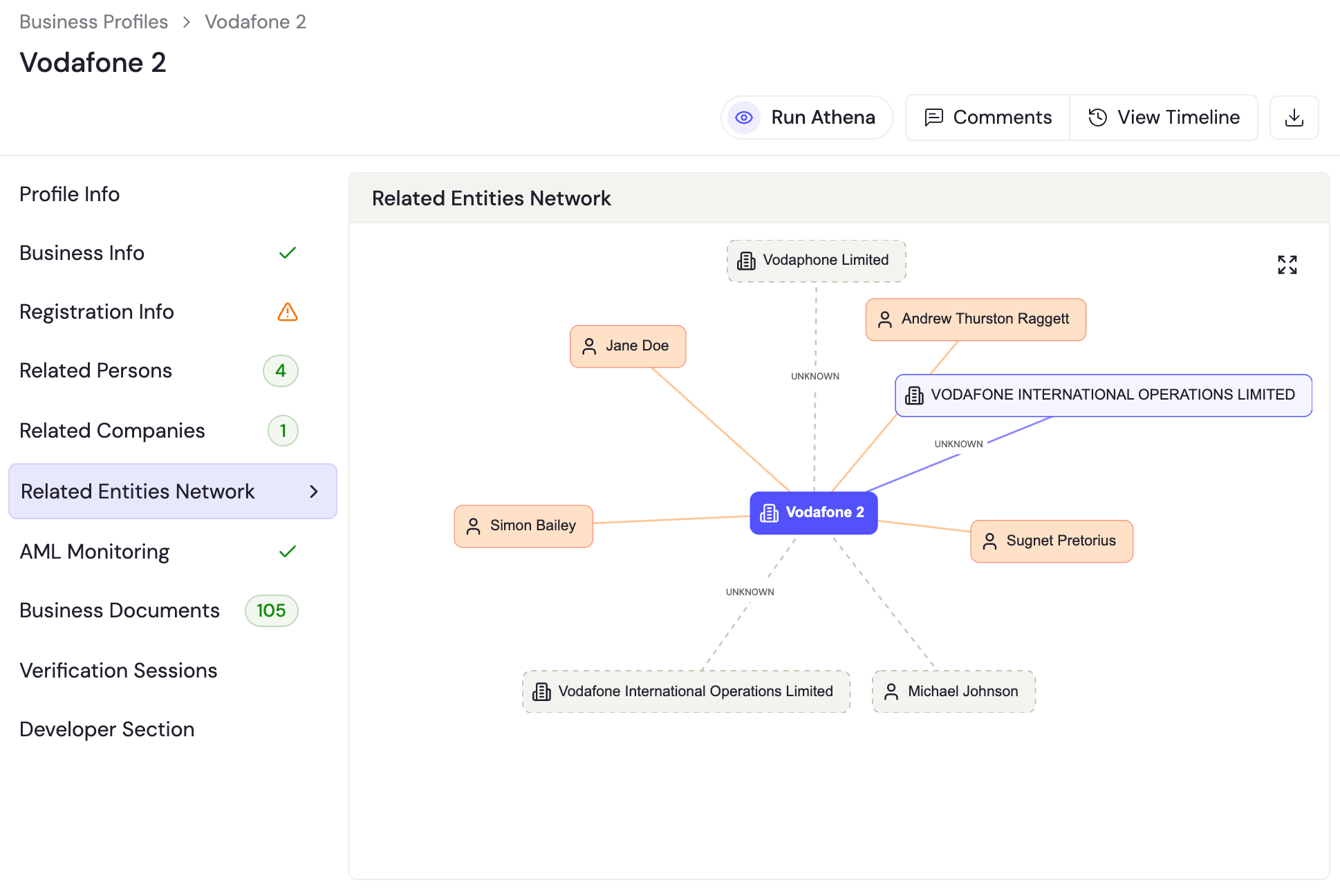
In the v2 model, every related entity is a node in a network. Each related person or company can carry its own related_people and related_companies. This lets AiPrise represent real-world ownership and control hierarchies:
Acme Holdings (root business profile)
├── Related Person: Jane Doe        (25%, Beneficial Owner)
├── Related Person: Simon Bailey    (Director)
└── Related Company: Global Parent Ltd   (60%, PARENT)
        ├── Related Person: Andrew Raggett   (Director)
        └── Related Company: Apex Trust      (100%, PARENT)
This is what powers the Related Entities Network visualization in the dashboard.
A related company is a full business profile of its own. When you add a company as a related company, it gets its own business_profile (and business_profile_id). That means you can do all the usual profile operations on it, just like any top-level business profile: run verification (KYB) on it, fetch it, update it, add its own related persons/companies, and monitor it.
The same is true for a related person: each is a full user profile you can verify (KYC) and manage independently.
You can also link an existing business profile as a related company (or link an existing user as a related person) instead of creating a brand-new one. This is handy when the entity already exists in your account.
Key concepts & new fields
Concept | v1 (single-level) | v2 (multi-level) |
|---|---|---|
Related person identity | Inline fields ( | Nested |
Related company identity | Inline fields ( | Nested |
Stable identifier | n/a |
|
Relationship kind | Implicit / via | Explicit |
Nesting | ❌ Not supported | ✅ Each entity carries its own |
Reverse / cross-source links | ❌ |
|
Format marker | n/a |
|
relationship_type values
For companies:
PARENT,CHILD,SIBLING,UNKNOWNFor persons: describes the person's relationship to the entity (e.g.
BENEFICIAL_OWNER,DIRECTOR,UNKNOWN)
Fields that carry over (unchanged meaning)
ownership_percent, shares_allocated, and roles[] (each role has name, start_date, end_date, is_active) exist in both v1 and v2.
Will my existing integration break?
No. This is the most important point.
Backward compatible by default. Until your account is opted in to the v2 related-entities format, you'll keep receiving the response exactly as you're getting it now for
related_peopleandrelated_companies. Your current parsing code keeps working with zero changes.You only need to take action when you want the richer multi-level data. Opting in is a deliberate choice, not a forced upgrade.
What do I need to update if I use the API? (v2 opt-in)
If and when you choose to adopt v2, here's the checklist.
1. Enable the v2 format on your account
The Related Person / Company Response Format is an account-level setting that AiPrise configures for you. It can be set to v1 or v2 (default: v1). Both formats are documented in the response of the Get Business Profile API. Contact your AiPrise representative or support to enable v2 for your company.
This setting controls the shape of related_people / related_companies returned by the Get Business Profile and Get Business Verification Result APIs and in your callbacks. It matters to anyone who reads related-person/company data from the API response or from callbacks.
Rollout happens Sandbox-first. AiPrise enables v2 on your Sandbox environment first. You build and validate against the new APIs there, and only once everything looks good (and you're satisfied) is Production migrated. The migration itself is atomic: if anything fails it rolls back fully, so there's never a partial/half-migrated state. The change is also reversible while you're validating.
2. Update how you read related persons
What you read today (v1) | What to read instead (v2) |
|---|---|
|
|
|
|
|
|
|
|
|
|
|
|
|
|
|
|
Plus new fields available in v2: person_reference_id, relationship_type, other_relationship_data[].
3. Update how you read related companies
What you read today (v1) | What to read instead (v2) |
|---|---|
|
|
|
|
|
|
|
|
|
|
|
|
|
|
|
|
Plus new fields available in v2: company_reference_id, relationship_type, other_relationship_data[], and, crucially, nested business_profile.related_people[] and business_profile.related_companies[].
4. Handle nested entities
This is the real conceptual change. In v1 you iterated one flat list. In v2 a related company's business_profile can itself contain related_people[] and related_companies[], so to capture the full ownership network you should traverse those nested entities rather than reading a single level.
⚠ Guard against deep / cyclic graphs. Real ownership networks can be deep and can contain loops (Company A owns B owns A). Cap how deep you traverse and de-duplicate by company_reference_id / person_reference_id to avoid processing the same entity twice.
5. Switch to the v2 management endpoints (if you write data)
If your integration adds, edits, or removes related entities (not just reads results), this is the bulk of the work: move from the legacy endpoints to the new v2 endpoints. Code these up first. Your account is only migrated once your integration is ready to use them.
Related Person APIs
Action | v2 endpoint | Docs |
|---|---|---|
Add related person |
| |
Edit related person |
| |
Delete related person (profile + association) |
| |
Delete association only (keep the user profile) |
| |
Link an existing user as a related person |
| |
Run checks (KYC) on a related person |
|
Related Company APIs
Action | v2 endpoint | Docs |
|---|---|---|
Add related company |
| |
Edit related company |
| |
Delete related company (profile + association) |
| |
Delete association only (keep the business profile) |
| |
Link an existing business as a related company |
| |
Run checks (KYB) on a related company |
|
New in v2: delete semantics. v2 separates removing the relationship from deleting the underlying entity. Use the association-only delete to detach a person/company from a profile while keeping their own profile (and history) intact; use the full delete to remove both.
The v2 add-company request now takes a nested business_profile object plus an explicit relationship_type (PARENT / CHILD / SIBLING / UNKNOWN), and returns { business_profile_id, company_reference_id }. The legacy add_* / update_* / remove_* endpoints are flagged as legacy in the API reference, with the note that new integrations should use V2.
6. Update your webhook/callback parsing
Your decision callback (callback_url) and event callback (events_callback_url) carry the same verification response shape as the GET result endpoint. So:
Before opt-in: callbacks contain the v1 shape, so no change is needed.
After opt-in: callbacks contain the v2 nested shape, so apply the same parsing updates from steps 2 to 4 to your webhook handler.
API endpoints reference
Base URLs: Sandbox https://api-sandbox.aiprise.com/api/v1/, Production https://api.aiprise.com/api/v1/. Auth: send your API key in the X-API-KEY header.
📌 The Get Business Profile API is where the new related-person/company response format (v1 or v2) is documented and returned. Start there when validating your parsing.
Purpose | Endpoint | Docs |
|---|---|---|
Get business profile (returns related entities in v1/v2 format) |
| |
Get business verification result |
| |
Create business profile |
| |
Run business verification |
|
For the full v2 Related Person and Related Company management endpoints (add / edit / delete / link / run-checks), see the two tables in step 5 above.
Full API reference: https://docs.aiprise.com/reference · Business Profiles guide: https://docs.aiprise.com/docs/business-profiles
Side-by-side response examples
v1: flat (current default)
{
  "verification_session_id": "vs_abc123",
  "aiprise_summary": { "verification_result": "APPROVED" },
  "related_people": [
    {
      "full_name": "Jane Doe",
      "birth_date": "1980-05-01",
      "email": "jane@acme.com",
      "ownership_percent": 25,
      "roles": [{ "name": "Director", "is_active": true }]
    }
  ],
  "related_companies": [
    {
      "name": "Global Parent Ltd",
      "tax_identification_number": "GB123456",
      "country_code": "GB",
      "ownership_percent": 60,
      "roles": [{ "name": "Parent", "is_active": true }]
    }
  ]
}
v2: multi-level (after opt-in)
{
  "verification_session_id": "vs_abc123",
  "aiprise_summary": { "verification_result": "APPROVED" },
  "related_people": [
    {
      "version": "v2",
      "person_reference_id": "per_9f8e...",
      "relationship_type": "BENEFICIAL_OWNER",
      "ownership_percent": 25,
      "shares_allocated": 250,
      "user_profile": {
        "full_name": "Jane Doe",
        "date_of_birth": "1980-05-01",
        "email_address": "jane@acme.com",
        "phone_number": "+44...",
        "address": { "full_address": "..." }
      },
      "roles": [{ "name": "Director", "is_active": true }],
      "other_relationship_data": []
    }
  ],
  "related_companies": [
    {
      "version": "v2",
      "company_reference_id": "com_1a2b...",
      "relationship_type": "PARENT",
      "ownership_percent": 60,
      "business_profile": {
        "business_profile_id": "bp_parent_001",
        "name": "Global Parent Ltd",
        "tax_identification_number": "GB123456",
        "country_code": "GB",
        "risk_info": { "verification_result": "APPROVED" },

        "related_companies": [
          {
            "version": "v2",
            "company_reference_id": "com_3c4d...",
            "relationship_type": "PARENT",
            "ownership_percent": 100,
            "business_profile": {
              "business_profile_id": "bp_apex_001",
              "name": "Apex Trust",
              "country_code": "GB"
            }
          }
        ],
        "related_people": []
      },
      "roles": [{ "name": "Parent", "is_active": true }],
      "other_relationship_data": []
    }
  ]
}
Notice how Apex Trust is nested inside Global Parent Ltd, which is itself a related company of the root — so the full ownership chain is preserved.
FAQ
Q: Should I migrate? Yes, we recommend it. v1 still works, but v2 unlocks the full ownership network, beneficial-owner chains, and verification + monitoring on every related entity — and it's where all new capabilities will land. Migrate at your own pace, with Sandbox to validate first.
Q: Will my current integration break when this rolls out? No. Until you explicitly opt in to v2, you'll keep receiving the response exactly as you're getting it now.
Q: How do I turn on v2? Ask your AiPrise representative / support to enable the v2 related-entities format on your account. The recommended order is: (1) you code up the new v2 APIs, (2) AiPrise enables v2 on Sandbox and you validate, (3) once you're satisfied, AiPrise migrates Production.
Q: Can I preview v2 without affecting production? Yes. Sandbox is migrated first. Test against the Sandbox base URL (https://api-sandbox.aiprise.com/api/v1/) before Production is touched. If something isn't right, the Sandbox migration can be reversed.
Q: What are the biggest code changes? Two things. (1) The CRUD APIs for managing related entities are changing — if you add, edit, delete, or link related persons/companies, you must move those calls to the new v2 endpoints (see step 5), which also introduce the association-only vs. full-delete distinction. (2) On the read side, you move from iterating one flat list to traversing the nested related-entities tree, reading person/company details from the nested user_profile / business_profile objects instead of top-level fields.
✨ Bonus: Let Claude migrate you from v1 → v2
To help you get started with the v2 integration, paste the prompt below into an AI coding assistant (Claude Code, Cursor, etc.) and fill in the [bracketed] parts. Think of it as a head start, not a finished migration — it gets the bulk of the changes scaffolded, and you should still review, test, and refine the output for your own codebase.
💡 Point the assistant at the code where you call the AiPrise business verification result endpoint and where you handle the verification webhook/callback. The more context you give it about your codebase, the better the starting point.
I integrate with the AiPrise Business Verification (KYB) API. AiPrise is upgrading
"related entities" from a flat single-level list (v1) to a nested multi-level network (v2),
and I want to migrate my integration to consume the v2 response format.

Context on the schema change:
- The verification result endpoint is
  GET /verify/get_business_verification_result/{verification_session_id}
  and the same response shape is delivered to my webhook (callback_url / events_callback_url).
- In v1, related_people[] and related_companies[] are FLAT. Person details
  (first_name, last_name, full_name, birth_date, email, phone_number, address, kyc) and
  company details (name, tax_identification_number, formation_date, country_code, website,
  email_addresses, phone_numbers, kyb) live as TOP-LEVEL fields on each entry.
- In v2, each entry is a node in a network:
    * Each related person has: version:"v2", person_reference_id, relationship_type,
      ownership_percent, shares_allocated, roles[], other_relationship_data[], and a NESTED
      user_profile object holding identity/KYC fields. Mapping:
        first_name      -> user_profile.first_name
        last_name       -> user_profile.last_name
        full_name       -> user_profile.full_name
        birth_date      -> user_profile.date_of_birth
        email           -> user_profile.email_address
        phone_number    -> user_profile.phone_number
        address         -> user_profile.address
        kyc             -> data lives inside user_profile
    * Each related company has: version:"v2", company_reference_id, relationship_type
      (PARENT | CHILD | SIBLING | UNKNOWN), ownership_percent, shares_allocated, roles[],
      other_relationship_data[], and a NESTED business_profile object. Mapping:
        name                        -> business_profile.name
        tax_identification_number   -> business_profile.tax_identification_number
        formation_date              -> business_profile.formation_date
        country_code                -> business_profile.country_code
        website                     -> business_profile.website
        email_addresses             -> business_profile.email_addresses
        phone_numbers               -> business_profile.phone_numbers
        kyb / result                -> business_profile.risk_info
    * CRITICAL: a related company's nested business_profile can itself contain
      related_people[] and related_companies[], recursively (multi-level).
- ownership_percent, shares_allocated, and roles[] (name, start_date, end_date, is_active)
  are unchanged and sit at the relationship level in both versions.

What I want you to do in my code at [PATH(S) TO MY AIPRISE PARSING CODE]:
1. Find every place I read AiPrise related_people / related_companies fields and update
   them to read from the nested user_profile / business_profile objects per the mapping above.
2. Replace any flat single-pass iteration over related_companies with a RECURSIVE traversal
   that also walks each company's nested related_people / related_companies. Cap recursion
   depth (e.g. 25) and de-duplicate by company_reference_id / person_reference_id to handle
   cyclic ownership graphs safely.
3. If I add/update/remove related entities via the API, switch my calls from the legacy
   endpoints to the v2 endpoints:
     Related companies:
       add     POST   /verify/related_company_v2
       edit    PUT    /verify/related_company_v2
       delete (profile + association)  POST /verify/delete_related_company_v2
       delete (association only)       DELETE /verify/related_company_association_v2/{business_profile_id}/{company_reference_id}
       link existing business          POST /verify/link_existing_business_as_related_company_v2
       run KYB on it                   POST /verify/run_verification_for_business_profile_id
     Related persons:
       add     POST   /verify/related_person_v2
       edit    PUT    /verify/related_person_v2
       delete (profile + association)  POST /verify/delete_related_person_v2
       delete (association only)       DELETE /verify/related_person_association_v2/{business_profile_id}/{person_reference_id}
       link existing user              POST /verify/link_existing_user_as_related_person_v2
       run KYC on it                   POST /verify/run_verification_for_user_profile_id
   The v2 add-company body takes a nested business_profile object plus an explicit
   relationship_type. Note the new distinction between deleting the association only
   vs. deleting the underlying profile + association.
4. Apply the same parsing updates to my webhook/callback handler.
5. Add or update unit tests with sample v1 and v2 payloads to prove both parse correctly,
   including a 2+ level nested company example.

My stack is [LANGUAGE/FRAMEWORK]. Show me a diff and explain the changes. Reference the
AiPrise API docs at https://docs.aiprise.com/reference if you need endpoint details.
Need help? Reach out to your AiPrise representative or support@aiprise.com. We can enable the v2 format on a Sandbox account so you can test the migration end-to-end before flipping production.