How to Set a Recommended ID Card in the AiPrise Onboarding SDK
Last updated: October 28, 2025
The Recommended ID Card feature in AiPrise’s Onboarding SDK allows you to highlight a preferred ID document for your users during the onboarding process. This helps guide customers toward using the most suitable or reliable form of identification — improving verification rates and user experience.
Step 1: Go to the Onboarding Configuration Page
From your AiPrise dashboard, navigate to the Onboarding Configuration section.
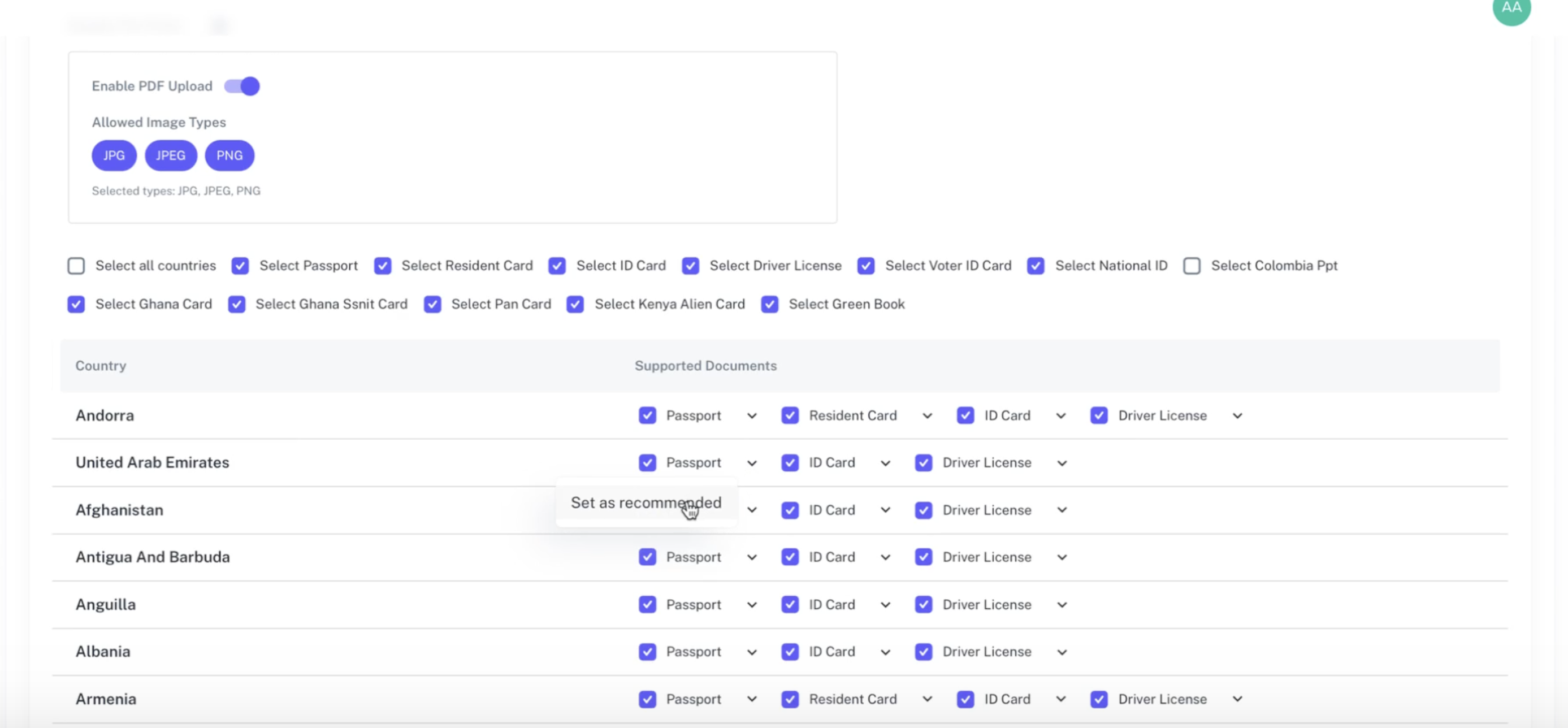
Under the Supported Documents list, you’ll see all the ID types available for a specific country (for example, UAE).
Step 2: Select a Recommended ID Card
From the list of supported documents:
Choose the document you want to mark as recommended — for example, Passport.
Click Set as Recommended.
Once selected, the chosen ID type will be marked as the preferred option for that country.
Click Save Flow to confirm your changes.
Step 3: Preview the Customer Onboarding Experience
When customers proceed through the onboarding flow:
They’ll see the recommended ID card displayed at the top of the document selection list.
A “Recommended” tag will appear next to that ID type, helping users understand that this is the preferred option to continue with.