Related Person and Company: Sources FAQ
Last updated: July 30, 2026
What do the groups "Added," "Suggested," and "Potential Duplicates" mean?
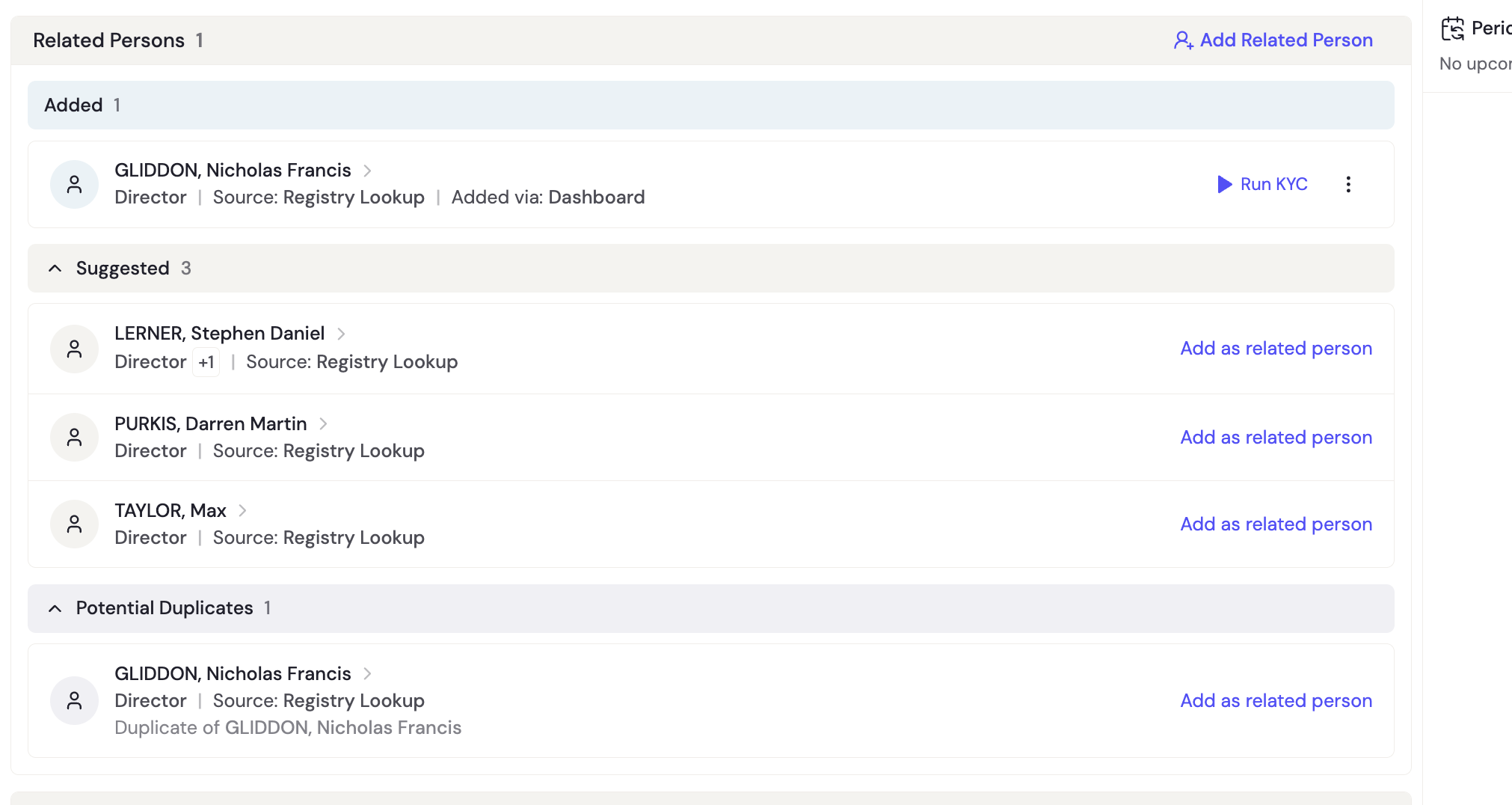
Related persons and companies are organized into three groups:
Added — Entities confirmed and committed to the business profile. These are part of the official record. Each shows both a Source (how they were found) and Added Via (where they were confirmed). You can run KYC on added persons and KYB on related company . They are either added by customer via onboarding form or by your compliance team (via API or dashboard)
Suggested — Entities discovered automatically but not yet accepted. They show only a Source (e.g., Registry Lookup) and no Added Via, because no one has confirmed them yet. Click "Add as related person/comapny" to move them to the Added group. You should review each suggestion and either accept or dismiss it.
Potential Duplicates — Entities that appear to match someone already added. The system flags these to prevent the same individual from appearing twice on a profile. Each shows which existing person it may be a duplicate of. If it's genuinely the same person, you can dismiss it. If it's a different person with a similar name, add it.
What are Source and Added Via?
Every related person on a business profile carries two tags. Source tells you what discovered the person. Added Via tells you where someone confirmed and added them to the profile. Together, they give you full traceability over every person on a business profile - who found them, and who added them.
Why is this useful?
When reviewing a business, you need to know whether a related person was pulled from an authoritative registry or manually typed in. A director discovered via government registry carries different weight than one added manually through the dashboard. If they don't add up or are in conflict, it may create a reason to dig deeper. Source and Added Via let you assess reliability at a glance without digging into logs.
What are the possible values?
Source (what discovered the person):
Registry Lookup — discovered via government/corporate registry
Website — discovered via web presence report
Document — extracted from an uploaded document
Manual — typed in directly by a person
Added Via (where they were added to the profile):
Onboarding Form — added by the customer during onboarding
RFI — added by the customer through a Request for Information flow
Dashboard — added by a compliance officer in the review dashboard
API — added programmatically via API
If the entity is still a suggested entity and not yet accepted; there won' be an added by section as it will still be in the suggested section
How do Source and Added Via work together?
Situation | Source | Added Via |
|---|---|---|
Suggested person, not yet accepted | (any) | None |
Registry lookup, accepted by compliance officer | Registry Lookup | Dashboard |
Customer typed during onboarding | Manual | Onboarding Form |
Registry suggestion accepted during onboarding | Registry Lookup | Onboarding Form |
Customer added via RFI | Manual | RFI |
Added programmatically | Manual | API |
Compliance officer typed in dashboard | Manual | Dashboard |
Website analysis, accepted in dashboard | Website | Dashboard |
Document extraction, accepted in dashboard | Document | Dashboard |
When do I see the "Added Via" badge?
Only when the person was added via Onboarding Form or RFI. These badges flag that the customer themselves added the person through a customer-facing flow. Persons added via Dashboard or API show no badge.
Can these values change after they're set?
No. Source is locked when the person is first discovered. Added Via is locked when the person is accepted into the profile. Neither changes after that.