How to Perform User AML Screening Using AiPrise
Last updated: January 19, 2025
AiPrise offers the ability to perform Anti-Money Laundering (AML) screening using a user's first and last name. This feature allows you to scan over 10,000 lists, including SDN, OFAC, Sanctions, and Adverse Media.
Using the API for AML Screening
To perform an AML screening, you'll use the same API endpoint as the regular user verification: https://docs.aiprise.com/reference/post_verify-run-user-verification
The response structure for AML information can be found in our documentation: https://docs.aiprise.com/docs/verification-result-1#aml_info
Configuring AML Settings
To use this feature effectively, you should configure your AML settings -
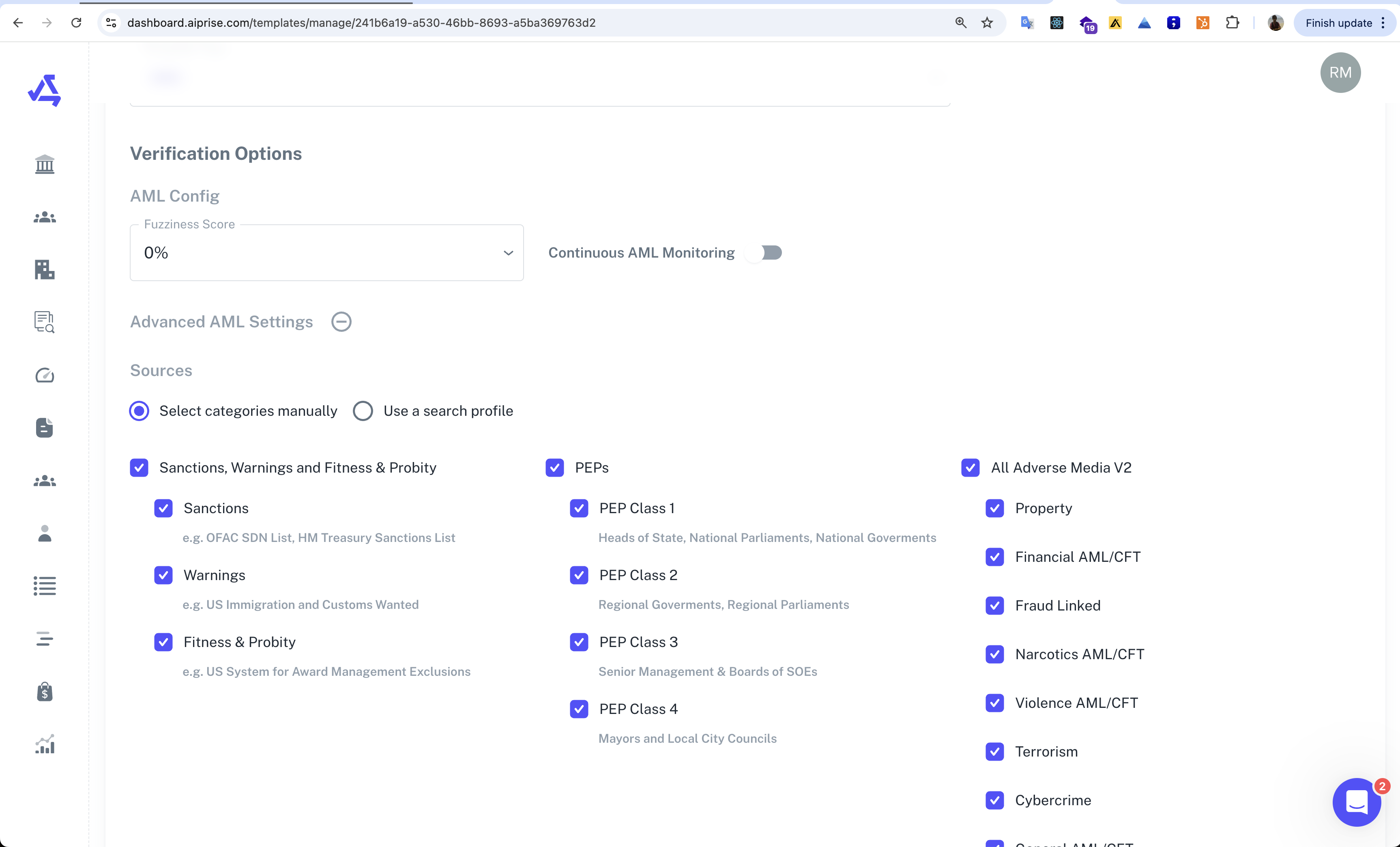
Go to your AiPrise dashboard and navigate to the 'Your Templates' section.
Click on the AML screening template
In the template settings, you can configure:
Fuzziness score for name matching
Whether to use exact name matching
Continuous AML monitoring options
AML categories to be scanned i.e Sanctions / PEP / Adverse Media etc.
Making the API Call
When making the API call, ensure you're using the correct template ID for your AML screening template. This will ensure that only the AML screening is performed, rather than a full user verification
Note: The specific template ID will be unique to your account. You can find this in your AiPrise dashboard under the Templates section.